

KPPSC Jobs 2026 Online Apply
Summary for KPPSC Jobs 2026
| WhatsApp Channel: | Join Now |
| Date Posted: | 04 February, 2026 |
| Category / Sector: | Government jobs |
| Newspaper: | Mashriq |
| Education: | Bachelor | Master | Mphil | M.Sc. |B.Sc. |
| BPS: | 15, 16, 17 |
| Age: | Upper Age Limit = 30 years. |
| Gender: | Both Male & Female |
| Area / Town: | Peshawar Other Area |
| Vacancy Location: | Peshawar, Khyber Pakhtunkhwa |
| Organization: | Khyber Pakhtunkhwa Public Service Commission ( KPPSC ) |
| Job Type: | Full Time |
| Job Industry: | Management Jobs |
| Expected Last Date: | 16 February, 2026 or as per paper ad |
Latest Khyber Pakhtunkhwa Public Service Commission KPPSC Jobs 2026
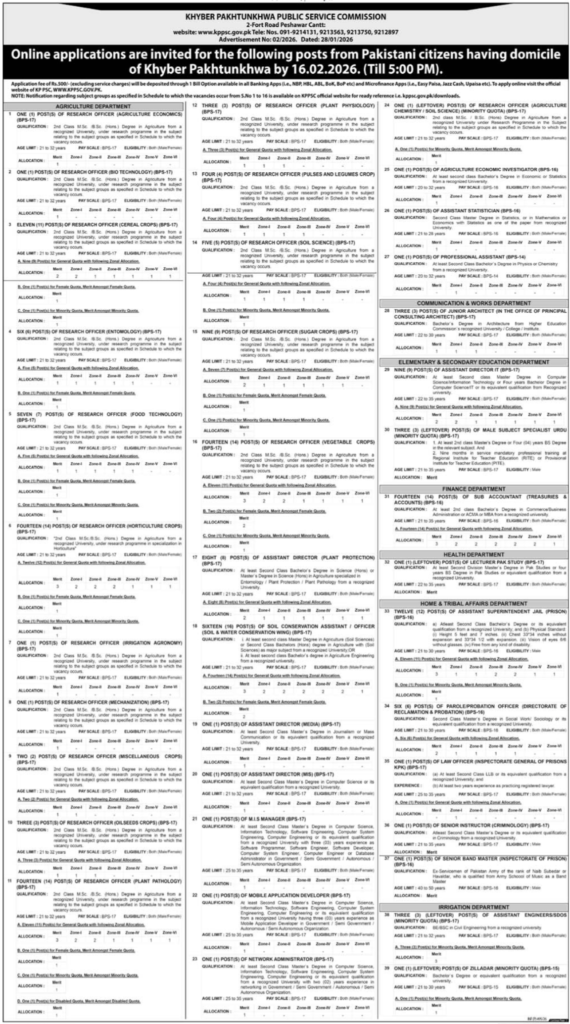
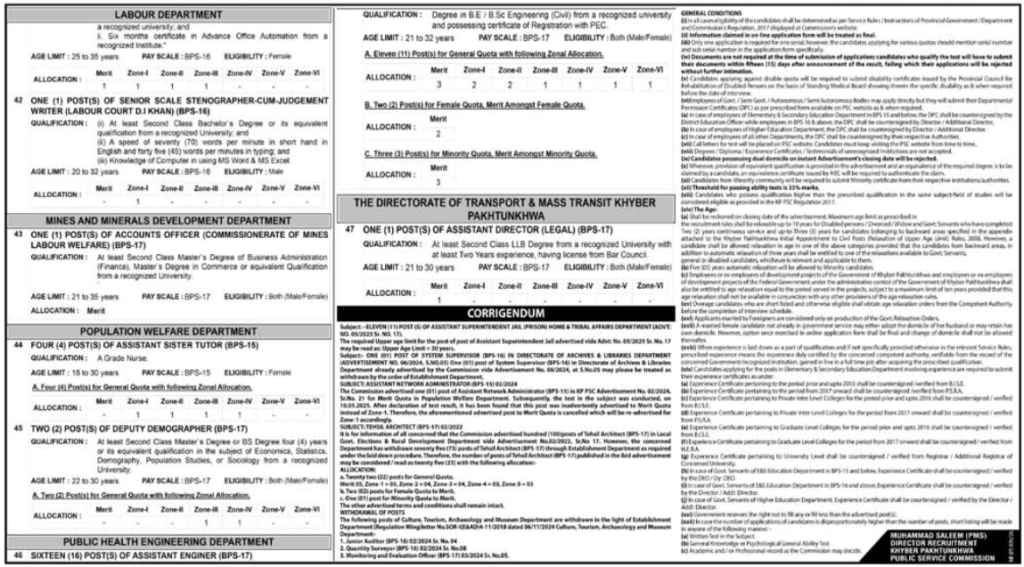
Vacant positions include Stenographer, Assistant, Parole Officer, Soil Conservation Officer, Mobile Application Developer, Assistant Engineer, Law Officer, Accounts Officer, Zilladar, Assistant Director It, Agriculture Economic Investigator, Assistant Sister Tutor, Sub Accountant, Architect, Probation Officer, Assistant Director, Assistant Statistician, Lecturer, Mis Manager, Network Administrator, Instructor, Subject Specialist, Deputy Demographer, and Soil Conservation Assistant. Educational qualifications such as a Master’s, MPhil, MS, or Bachelor’s degree will be preferred.
Apply to Khyber Pakhtunkhwa Public Service Commission KPPSC for the latest government vacancies in management and departments before the closing date of February 16, 2026, or as specified in the media advertisement. Read the full ad here to learn how to apply for the current Khyber Pakhtunkhwa Public Service Commission KPPSC job openings.
How to apply online step by step
Step 1:
- First of all open official website
- Go to browser & type:
- 👉 www.kppsc.gov.pk
Step 2:
- In step 2 Check Advertisement (Jobs)
- There’s an Advertisements section on homepage.
- Select job of your choice from here.
- Check complete job details & eligibility.
Step 3:
- Then Click on “Apply Online” button.
- Below job details, there will be “Apply Online” button.
- Click on it.
Step 4:
Then Register an account (if not already created)
If you are a new user:
Click on “Create New User Account”
Enter these details:
- CNIC number
- Email address
- Phone number
- Gender
- District of Domicile / Area / Zone
- Password
- Re-enter Password
- and then click “Create new user profile”
Login after account is created. Do it
Step 5:
Complete Profile
After Login:
Personal information (Father Name ,Marital Status,Postal Address, Permanent Address, Mobile Number, WhatsApp Number,Preferred Exam Station, Date of Birth, Religion, Nationality, Father Occupation, Government Servants) Fill in all information exactly as per your CNIC & documents.
- Add Educational details
- Experience (if required)
- Add Picture
- Fill in all information exactly as per your CNIC & documents
Step 6:
- Select the job you wants to apply for
Step 7:
Generate application fee challan
- Fee usually:
- Application fee of Rs.500/- (excluding service charges) will be deposited through 1 Bill Option available in all Banking Apps (i.e., NBP, HBL, ABL, BoK, BoP etc) and Microfinance Apps (i.e., Easy Paisa, Jazz Cash, Upaisa etc).
Step 8:
- Submit application after paying fee
- After adding the challan details to system,
- Then Click the Final Submit button
Step 9:
Print application
- After the application is submitted,
- Be sure to print/save the PDF.
- This is very important for future reference.
( Advertisement )
Original Source: https://mashriqtv.pk/e-paper/?pageno=5&date=03-02-2026
| Disclaimer |
|---|
| Be wary of fraudulent recruiting activities. If an employer asks you to pay money for whatever reason, do not pay and report it to us using our contact form. Human typing errors are possible. Except for errors and omissions. |